Today
Today reads your accounts and suggests work; Run starts it, Discuss drafts it, Add to Tasks keeps it.
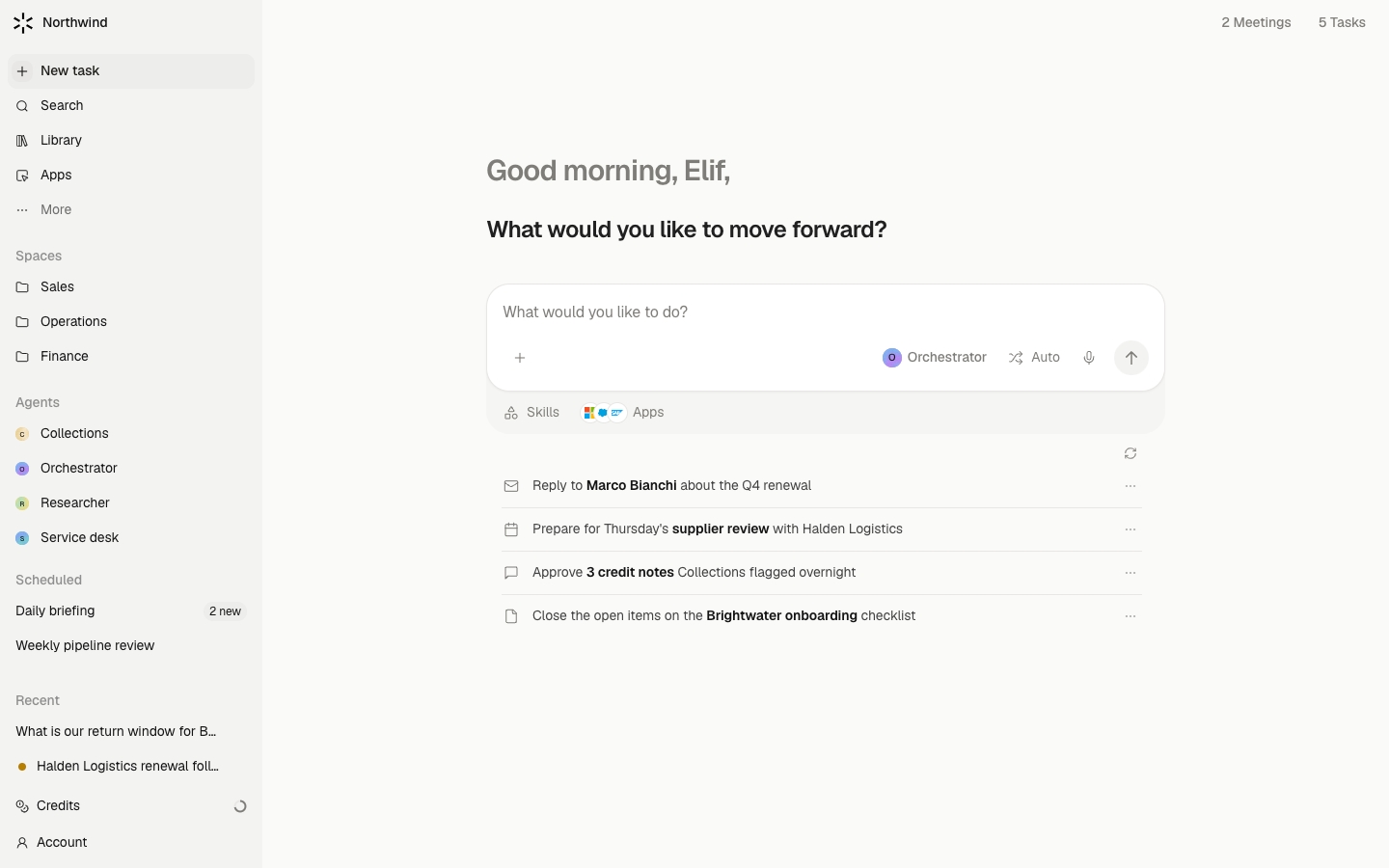
Today is where you land. It greets you, shows one headline about what matters most, and lists what Meridian suggests you do next, based on your email, calendar, meetings, files, and recent chats. The composer at the top starts ordinary work. The sidebar row New task brings you back here from anywhere.
Steps
- Read the headline. It is one sentence with one supported takeaway, such as a deal that moved or a meeting whose stakes changed. Hover it, or any suggestion, to see the reason and the sources behind it.
- Work down Suggested for you. Each row is an observation with a short action. Run starts a chat that does it (when a specialist fits, the button reads Run with that agent). Discuss drafts the request into the composer so you can change it before sending. Add to Tasks keeps it for later. Dismiss hides it until something new happens.
- Open the rail. The toolbar shows {n} meetings and {n} Tasks. Either opens a panel on the right with today's Calendar and your open Tasks. Section titles open the full surfaces.
- Ask for anything else. The composer is a normal chat. Type what you want and send it; the conversation opens as a thread and Today stays where it was.
- Refresh when you want. Suggestions refresh on their own when your sources change. The refresh control shows when evidence was last checked and how many items were read.
What waits for your approval
Today only reads. Running a suggestion opens a chat, and anything that chat wants to send or change asks you on a card there, as always.
Limits
- Suggestions come from a bounded read: recent email threads, upcoming calendar, past meeting notes, indexed Drive files, Library files, and your recent chats. An account you connected but that has no reader yet is not checked.
- An empty list is a valid answer. Meridian does not pad the page with generic starters or claim you are caught up.
- Refreshes are paced: at least two minutes between checks and fifteen minutes between new lists, with a daily cap. The tooltip shows the next time a manual refresh is allowed.
- Today is yours. It does not show what a colleague should do.